Deploying an agent
UserLock agents are required to enforce access policies and track user sessions. The easiest way to deploy them is directly from the UserLock console. If your machines accept no inbound network traffic, deploy the Desktop agent with Group Policy. For advanced scenarios (IIS, NPS, or manual deployment), see the linked guides.
Useful resources
Console and automatic deployment require the UserLock server to reach the machines (ping, SMB, Remote Registry) with an impersonation account that has administrative rights on them. See Requirements.
In the UserLock console, go to Environment ▸ Machines.
Select one or more machines and click on the Actions button.
In the menu, click to Install the Desktop, IIS or NPS agents.
In the upper right corner, the Admin action icon animates. Click it to monitor the installation progress.
Instead of deploying the Desktop agent manually on each workstation, you can let UserLock handle the distribution automatically.
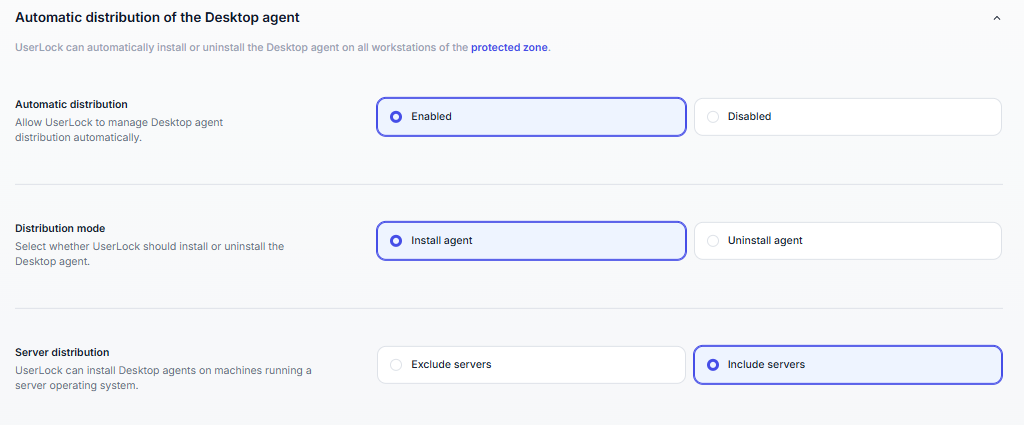
In the upper right corner of the UserLock console, click the Settings icon.
In the left menu, click Machines.
Under Automatic Desktop agent deployment, select one of these modes:
Install the Desktop agent on workstations: servers are skipped.
Install the Desktop agent on workstations and servers: machines running a server OS are included.
Optionally, enable Automatic start of the remote registry service. This avoids deployment failures on machines where the service is stopped.
Save your changes.
UserLock then deploys the Desktop agent on every machine in the protected zone. This covers the machines already in the zone and the ones added later.
Note
For the uninstall mode, reboot settings and deployment prerequisites, see Machines.
If your machines accept no inbound network traffic, or if you already deploy software with Group Policy, deploy the Desktop agent MSI packages with a GPO. The machines only need to reach the UserLock server; the server never connects to them. The same approach works with any third-party deployment tool.
Useful resources
Agents can also be installed manually in cases where console deployment is not possible. Options include:
Running the installer locally on the machine.
Deploying through a script.
Using a third-party deployment tool with the MSI packages.
Manual deployment is typically used for advanced or large-scale scenarios.
See the following guides to help you through manual installation.