Active Directory search
Understand how UserLock searches Active Directory, matches search terms, and searches across domains and trusted forests.
The Active Directory search field lets you find and select a user, group, organizational unit or machine in UserLock, for example the target of an access policy.
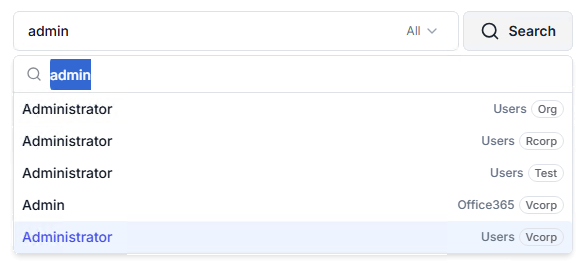
Results appear once you type at least 2 characters.
Each result shows its parent container or organizational unit.
The number of results is not limited.
If the search takes more than 10 seconds, it continues and UserLock suggests refining the search term.
When a search returns results from several domains, each result displays a badge with its domain name.
A search returns the entities that have an attribute starting with the search term (prefix matching). A term that appears only in the middle of an attribute is not matched. This follows the native Active Directory behavior and keeps searches fast in large directories.
For example, for a user named John Smith, joh and smi find the user, but mit doesn’t.
The attributes compared depend on the entity type:
Entity | Attributes searched |
|---|---|
Users | ANR, |
Machines | ANR |
Groups |
|
Organizational units |
|
ANR (Ambiguous Name Resolution) is an Active Directory search that matches the beginning of several name attributes at once, such as first name, last name, display name and logon name.
Note
Local accounts of the UserLock server, in Standalone mode, are matched on any part of their account name.
To match any part of names instead, see FAQ > Configuration.
The domain picker next to the search field sets where the search runs. The entries it lists and the default scope depend on your environment:
Environment | Domain picker entries | Default scope |
|---|---|---|
One domain | ❌ Picker hidden | Current domain |
Several domains in one forest |
| Global catalog |
Trusted forests |
| All |
Standalone mode, domain-joined machine |
| All |
Standalone mode, workgroup machine | ❌ Picker hidden | Local accounts of the UserLock server |
Each entry searches:
Entry | Searches |
|---|---|
All | Every domain of every forest. In Standalone mode, also the local accounts of the UserLock server. |
Global catalog | Every domain of the current forest. Trusted forests are not included. |
Domain name | That domain only. |
Local (SERVERNAME) | Local accounts of the UserLock server only. |
Domains are listed by NetBIOS name, with child domains under their parent. Hover over a domain to display its FQDN.
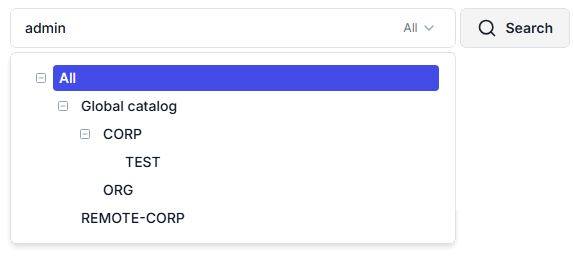
UserLock lists the domains of a trusted forest in the domain picker when both conditions are met:
A two-way forest trust exists between the current forest and the trusted forest. External trusts and domain trusts are not supported.
The UserLock server can reach a domain controller in each domain of the trusted forest. For the required ports, see Communication and required protocols.
UserLock updates the list of domains:
When the UserLock Service Helper service starts.
Every 12 hours.
A few minutes after a failed update.
💡 Tip
To display a newly created trust without waiting for the next update, restart the UserLock Service Helper service on the UserLock server.