Cloud audit
How FileAudit collects and stores file activity from supported cloud storage providers.
Cloud audit is an add-on option that extends FileAudit's file activity monitoring to cloud-based storage providers. It provides a consolidated view of all file activity, combining on-premises Windows audit data and cloud events into the same reports and alerts.
Cloud events are collected through each provider's official audit interfaces, imported into the FileAudit database, and normalized into FileAudit's event model. Cloud audit does not install any agent on the provider side.
Taking the example of Microsoft OneDrive, each time a user reads, writes, or performs any action on a file or folder, the OneDrive client application synchronizes the changes with Microsoft servers.
If the action is performed directly from the Microsoft Office 365 portal, the modification is made directly on Microsoft's servers.
In both cases, by validating the Consent Screen displayed by FileAudit, you allow Microsoft — or your chosen provider — to send notifications to our own Cloud application, which converts and completes the data before transmitting the information to your local FileAudit service.
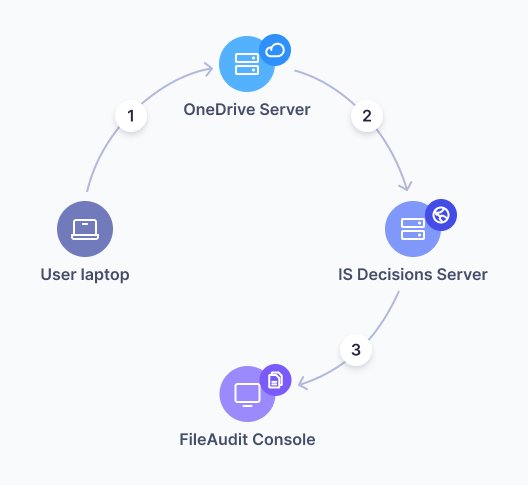
FileAudit only reads file metadata — never the contents of a file. The information we receive is limited to what's needed for forensic investigation: the user who triggered the action, the filename, the date, the operation itself, the IP address, etc.
We store no information about file and folder operations, except temporarily when the local FileAudit instance is disconnected — in which case notifications are kept for up to 30 days until the connection is re-established.
Provider | Minimum plan | Notes |
|---|---|---|
Dropbox Business | Advanced | |
Box | Business | |
OneDrive for Business | Standard | Includes SharePoint Online and Teams activity |
Google Workspace | Business Advanced | Starter plans do not support Drive admin logs |
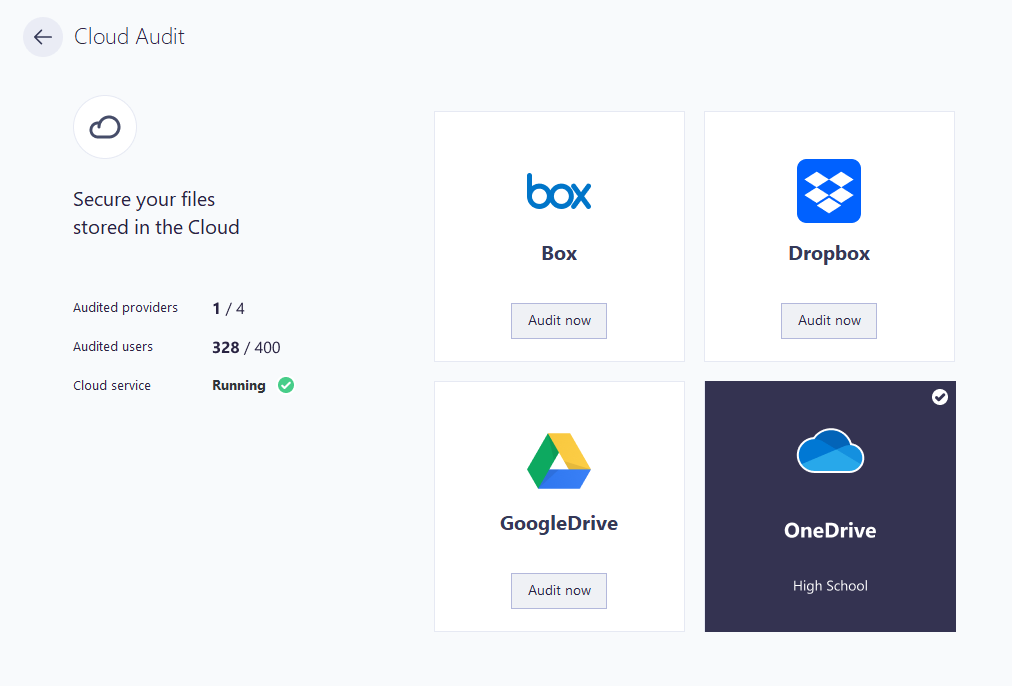
Connecting a cloud provider requires a tenant administrator to authorize FileAudit through the provider's consent flow. The administrator is redirected to the provider's website to approve access. A standard user account cannot complete this step.
FileAudit requests read-only access to the provider's audit log. It does not access file content, only activity metadata (who accessed what, when, and how).
Cloud audit differs from Windows audit in how it defines what is monitored:
There are no audited paths to configure. Once a provider is connected, all files and folders in the tenant are included automatically.
FileAudit retrieves events from the provider's audit log at regular intervals. It does not receive real-time push notifications from all providers.
The available access types and metadata fields depend on what each provider exposes. FileAudit cannot collect events the provider does not record.
Event delivery speed varies significantly between providers:
Provider | Typical latency |
|---|---|
Box | A few seconds |
Dropbox | A few seconds |
Google Workspace | 5 to 15 minutes |
OneDrive / SharePoint | 5 to 15 minutes |
The delay for Google and Microsoft is caused by their internal event processing pipelines, not by FileAudit.
Cloud events are stored in the same FileAudit database as Windows audit events. Both share the same database maintenance operations: archiving, cleanup, and migration.
For production deployments with Cloud audit enabled, the volume of events may grow significantly. Use a SQL Server database rather than the default SQLite.
Note
See Set production database Guide for migration instructions.
Database architecture Reference
OneDrive for Business handles file storage for SharePoint Online and Teams. No additional configuration is needed: enabling Cloud audit for OneDrive automatically collects file activity from SharePoint Online and Teams.
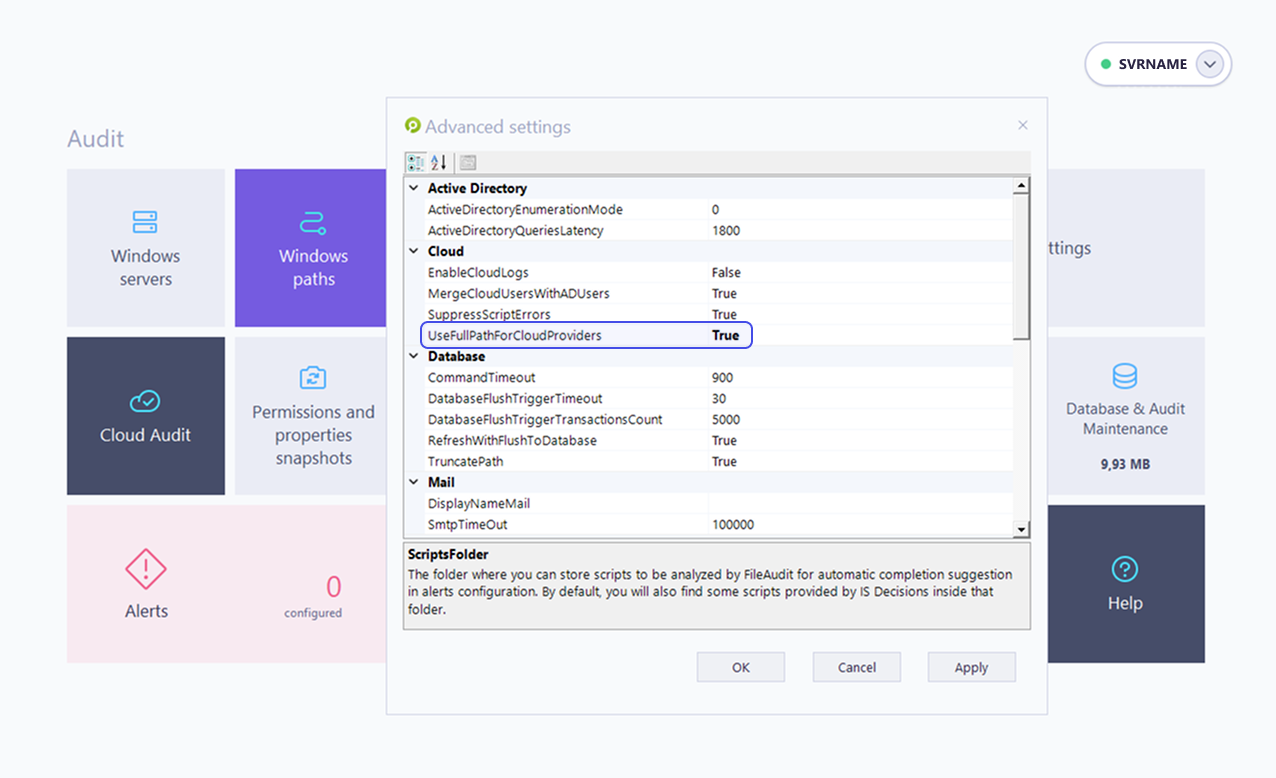
By default, all these events appear as OneDrive events in FileAudit reports. To display the SharePoint site name in the file path, set the advanced setting UseFullPathForCloudProviders to True (press F7 in the console to access advanced settings).
⚠️ Important
Do not modify advanced settings without guidance from IS Decisions support, unless the change is specifically documented.
If the Google Drive audit fails to activate, the Google Workspace tenant may restrict third-party API access. FileAudit must then be added to the list of trusted apps in the Google Admin console.
FileAudit Client ID for the trusted apps configuration:
330456967547-e282tdiqkgsla6vcbot282otcoid4cgd.apps.googleusercontent.comRefer to Google's documentation on controlling API access for the procedure.
FileAudit can only collect events that the provider records and exposes. Some file operations may not generate audit events.
Event retention on the provider side is governed by the provider's policies. FileAudit cannot retrieve events that have expired in the provider's audit log.
Collection latency depends on provider-side processing (see Event delivery latency by provider).
Path-level filtering is not available for cloud events. All tenant activity is collected.