Reduce Security event log volume
Enable only the audit subcategories FileAudit needs to reduce the number of events written to your file server Security log.
FileAudit enables every subcategory of the Object Access audit policy automatically, but the audit only uses three of them. Configuring just these three in the Advanced Audit Policy Configuration stops the file server from logging events FileAudit never reads.
On the file server FileAudit monitors, open the Local Security Policy console.
Expand System Audit Policies - Local Group Policy Object.
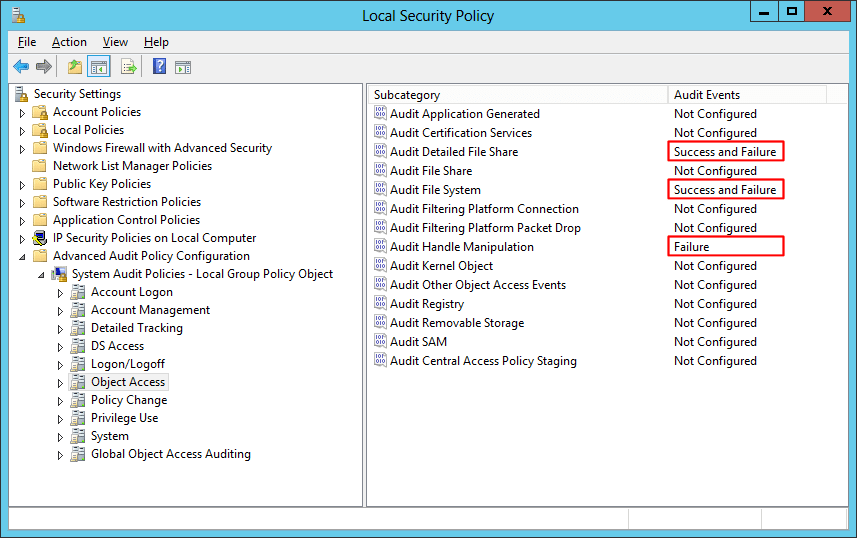
Set the following three subcategories:
Audit Detailed File Share: Success and Failure
Audit File System: Success and Failure
Audit Handle Manipulation: Failure
Note
⚠️ Important
Whichever method you use, setting the Advanced Audit Policy Configuration overwrites the default (basic) audit policy on the file server.
To apply the same settings without the console, run these commands in an elevated Command Prompt on the file server:
auditpol /set /subcategory:"File System" /success:enable /failure:enable
auditpol /set /subcategory:"Detailed File Share" /success:enable /failure:enable
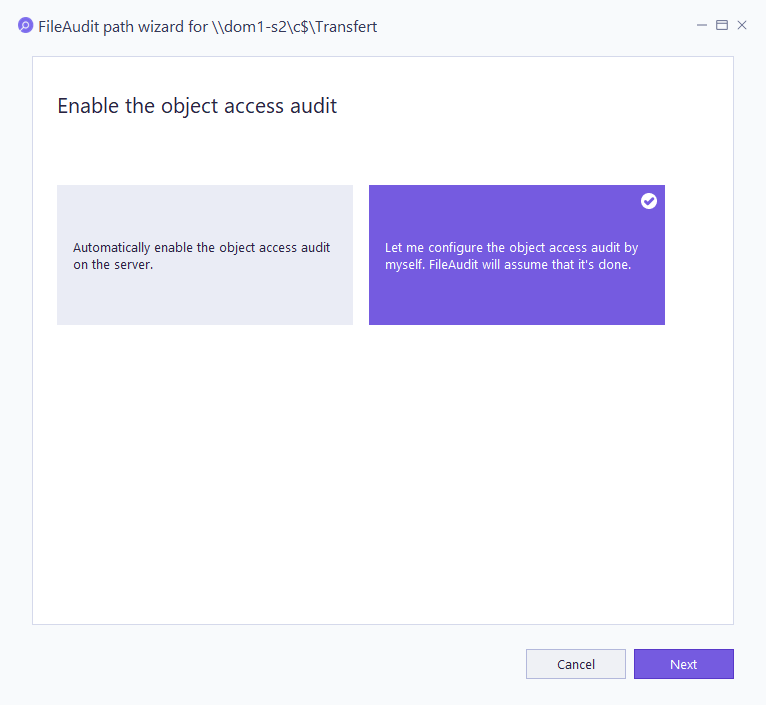
auditpol /set /subcategory:"Handle Manipulation" /success:disable /failure:enableFileAudit cannot detect the Advanced Audit Policy Configuration. During its checking process it prompts you to reset the Object Access audit. To avoid this prompt, select Let me configure the object access audit by myself when asked.
For the initial audit setup and what the checking process does, see Manage Windows audit.