Clean records
Permanently delete old or all records from the production database to reduce its size or comply with your data retention policies.
Cleaning permanently deletes records from your production database to reduce its size or comply with your data retention policies..
Deleted records cannot be recovered, and they are not copied anywhere first.
Before you clean, consider the alternatives:
To reduce the production database while keeping your data, use Archive database instead. Archiving moves records to a separate database you can still query, rather than deleting them.
If you are running low on space with the default SQLite or SQL Express database, the issue may be the database itself rather than the volume of records. Moving to a more robust database can be a better long-term fix: see Database architecture Reference for the supported options, and Migrate to another database to switch while keeping your data.
Only clean records once you are sure you no longer need the data and have ruled out archiving or changing the database.
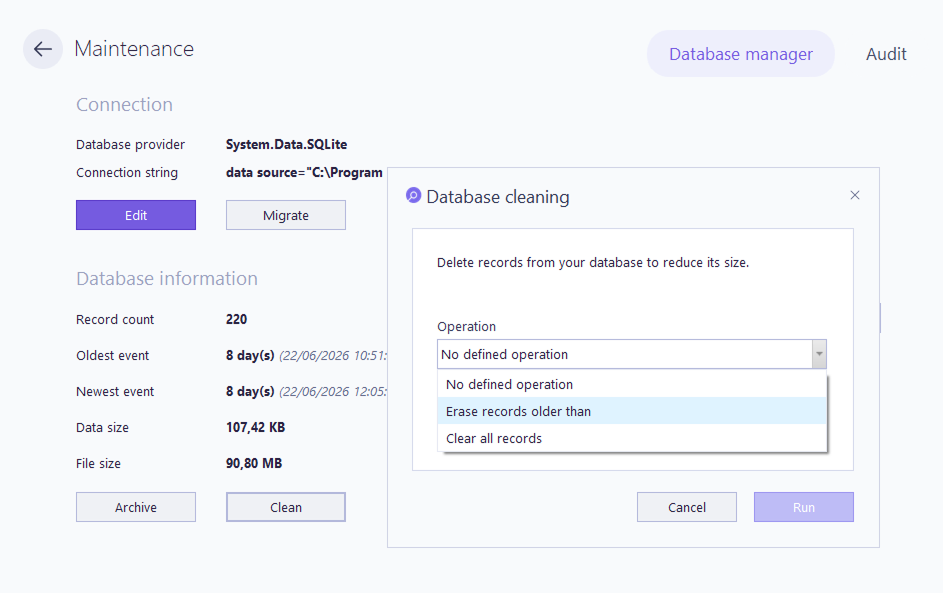
On the main screen, click the Database & audit maintenance tile. On the Database manager tab, click Clean.
In the Operation field, select what to delete:
Erase records older than: deletes records past the age you set.
Clear all records: deletes every record in the database.
If you selected Erase records older than, set the number of days of records to keep.
Click Run.
The Scheduling panel in Database manager runs cleaning automatically on a recurring basis.
In the Operation field, select Erase records older than and set the number of days to keep.
Set Schedule task to the frequency you want.
Set the Start time.
Select the Days of week to run the task.
To schedule archiving instead of deletion, see Archive database.