Comply with the CJIS Security Policy
Here's how UserLock and FileAudit support CJIS compliance across key controls.
The FBI's Criminal Justice Information Services (CJIS) Security Policy sets minimum security requirements for any agency or organization that accesses Criminal Justice Information (CJI). The policy applies to all entities who have access to, or who support, FBI CJIS Division's services and information.
The policy is built around 13 policy areas that together define a comprehensive security baseline, covering everything from access control and auditing to incident response and system integrity.
Non-compliance carries serious consequences: loss of access to CJI systems, potential fines, and, most critically, increased exposure to credential theft, which accounts for nearly half of all public safety data breaches.
For agencies running on-premises and hybrid Active Directory environments, meeting these requirements can be a significant challenge.
But compliance doesn't have to mean a full infrastructure overhaul. That's where UserLock and FileAudit help.
Already know what you're looking for? Jump to the full control mapping.
UserLock and FileAudit address a meaningful subset of the highest-priority CJIS control families directly. Physical security, contingency planning, and cryptographic models are out of scope.
Authentication and MFA enforcement (IA)
Account lifecycle and session management (AC)
Logon event logging and audit records (AU)
File access monitoring and CJI data auditing (AU/SI)
Real-time anomaly alerting and incident support (IR/SI)
Remote access controls and restrictions (AC-17)
Physical access controls and facility security (PE)
Encryption at rest and in transit (SC-13, SC-28)
Vulnerability scanning and patch management (RA-5, SI-2)
Contingency planning and disaster recovery (CP)
Personnel screening requirements (Section 5.12.1)
Firewall and boundary protection devices (SC-7)
Deployed on-prem, UserLock and FileAudit extend your existing Active Directory infrastructure. No cloud dependency, works in air-gapped environments.
CJIS requires multi-factor authentication for every user accessing CJI, whether they connect remotely or from within a secure facility. That means MFA is a must across all users, not just for admins, and not just for remote access. IA-2(1) and IA-2(2) are both Priority 1 and sanctionable from October 2024.
UserLock enforces Active Directory MFA on-premise at the Windows authentication layer across:
Windows logons
RDP and Remote Desktop Gateway
VPN connections
SaaS applications via SSO
IIS web applications
UAC elevation prompts
Granular session-based rules ensure effective security, but feel lightweight for end users.

UserLock intervenes during the Windows authentication flow before a session is created. When a user logs on UserLock prompts them for a second factor.
Adminstrators can set MFA rules on existing AD users, groups, and OUs, so sworn officers, dispatchers and IT staff can have different MFA requirements.
The authenticator options include up to two MFA methods per user: TOTP authenticator apps, hardware keys, push notifications, are all replay resistant, satisfying IA-2(8) without additional configuration.
CONTROL | REQUIREMENT SUMMARY | PRIORITY | USERLOCK | HOW USERLOCK HELPS | FILEAUDIT | HOW FILEAUDIT HELPS |
|---|---|---|---|---|---|---|
IA-2(1) MFA: Privileged accounts | Implement multi-factor authentication for all privileged account access. | P1 | Enforce MFA granularly by AD user, group, and OU (Windows logon, remote access, SaaS connection, and Windows UAC prompts). | |||
IA-2(2) MFA: Non-privileged accounts | Implement multi-factor authentication for all non-privileged account access. | P1 | Apply MFA across all user accounts with granular session-based rules, with flexible self-enrollment. | |||
IA-2(8) Replay-resistant authentication | Use replay-resistant authentication mechanisms (e.g. time-based OTP, cryptographic challenges) for all accounts. | P1 | Choose up to 2 TOTP and push-based MFA methods for each user. Each code is valid for a single authentication event. | |||
IA-4 Identifier management | Manage system identifiers by assigning unique IDs per individual and preventing reuse for at least 1 year. | P2 | Enforce unique logon identifiers per session; Prevent shared account use with limits on concurrent logins and simultaneous sessions; audit trail maps all activity to individual user accounts. | |||
IA-5 Authenticator management | Manage authenticators including verifying identity before distribution, enforcing minimum strength, changing defaults, and revoking on compromise. | P1 | Manage MFA authenticator enrollment; limit how many authentication attempts can take place within a given timeframe; disable any MFA method at any time. | |||
IA-11 Re-authentication | Require re-authentication when roles or credentials change, security categories change, privileged functions are executed, or every 12 hours. | P2 | Enforce session time limits and trigger re-authentication after defined intervals or on privilege escalation events. |
The AC family is where many on-prem and hybrid agencies struggle. Not because they don't have access controls per-se, but because the controls aren't granular enough. CJIS requires per-account session limits, automatic inactivity lockout at 30 minutes, and the ability to identify and disable a high-risk account within 30-minutes of discovery. These requirements demand active enforcement, not just policy documentation.
UserLock enforces contextual access controls based on:
Origin (Device, workstation, IP address)
Time (time quotas, maximum session time, idle session time)
Session type (choose how many of each session type to allow per user)
Concurrent logons (choose how many initial access points to allow)
Simultaneous sessions (limit the number of simultaneous sessions to allow per user)
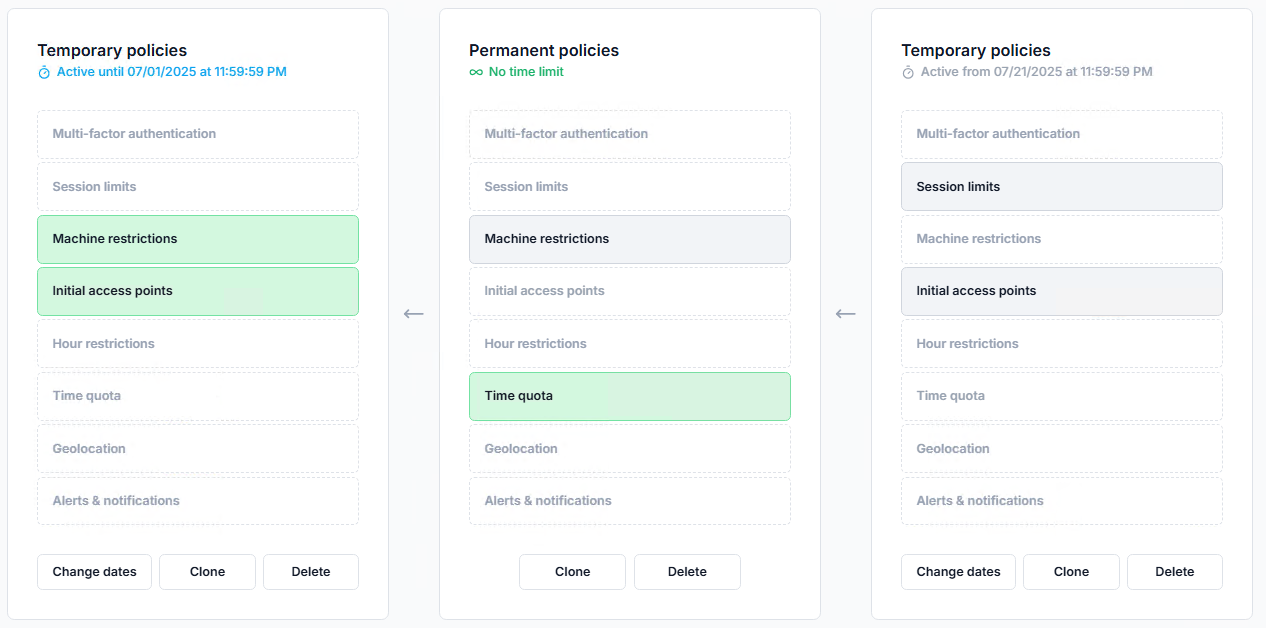
With UserLock, admins monitor all active sessions and set up alerts. With one click, it's easy to logoff or block a user with suspicious behavior.

To enforce session timeouts, UserLock allows you to set idle time.
Example configuration
Setting | Value |
|---|---|
Screen saver delay | 10 minutes |
Maximum locked time | 10 minutes |
Result | ➡️ Logoff after 20 minutes of total inactivity |
CONTROL | REQUIREMENT SUMMARY | PRIORITY | USERLOCK | HOW USERLOCK HELPS | FILEAUDIT | HOW FILEAUDIT HELPS |
|---|---|---|---|---|---|---|
AC-2(5) Inactivity logout | Require users to log out after a work period. Enforce automatic session termination after activity. | P1 | Enforce session time limits and automatic logoff after defined inactivity periods, per user or group. | |||
AC-2(13) Disable high-risk accounts | Disable accounts of individuals within 30 minutes of discovery of a direct threat to CJI confidentiality, integrity, or availability. | P1 | Administrators can instantly lock or disable any account from a single console; real-time alerts flag suspicious logon activity. | |||
AC-3 Access enforcement | Enforce approved authorizations for logical access to information and system resources. | P1 | Enforce granular access restrictions based on existing AD user, group, or OU, time, device, geolocation, and session type. | Logs and audits all file access attempts, including denied access to CJI data stores in Windows files, file servers, and cloud storage. | ||
AC-6 Least privilege | Grant users only the minimum access required to perform their assigned tasks. | P1 | Set different MFA and contextual access policies at the session level according to existing AD users, groups, and OUs. | Surfaces users with excessive file permissions; supports access rights review and remediation. | ||
AC-7 Unsuccessful logon attempts | Lock accounts after N consecutive invalid logon attempts within X minutes. Require admin to unlock. | P3 | Monitor and get alerts on failed logon patterns; can block accounts after a configurable threshold, complementing Windows policy. | |||
AC-11 Device lock | Initiate device lock after a maximum of 30 minutes of inactivity. Require re-authentication to unlock. | P4 | Enforce session time limits and automatic logoff after defined inactivity periods. Set re-authentication frequency by session type. | |||
AC-17 Remote access | Establish and document usage restrictions for all remote access. Authorize each type before allowing connections. | P1 | Control and monitor all remote access by session type: Remote Desktop (RD Gateway, RDP, RD Web), RemoteApp, VPN. Can trigger MFA for remote connections on any session type. | Audit remote file access events and set up alerts for unusual off-hours or off-site access to CJI file stores. |
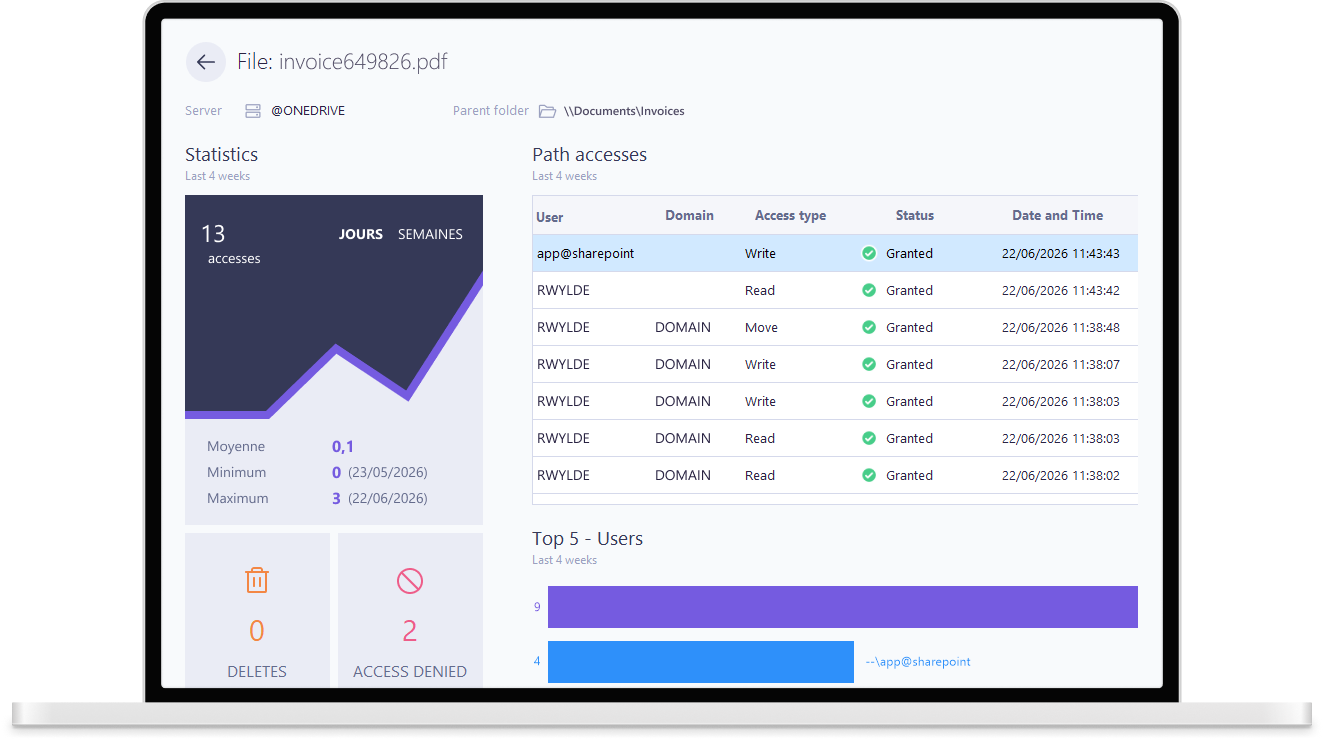
CJIS requires a complete, tamper-proof audit trail of all access to CJI:
Who accessed what
When
From where
Whether it was successful.
UserLock covers logon and session access events, while FileAudit covers file-level access to CJI data in Windows file servers and cloud storage. Together, they address both layers of key AU control requirements.
With UserLock, admins can audit access events at the AD user, group, or OU level.

FileAudit allows admins to monitor and audit file access events, tracking each event to a user account.
CONTROL | REQUIREMENT SUMMARY | PRIORITY | USERLOCK | HOW USERLOCK HELPS | FILEAUDIT | HOW FILEAUDIT HELPS |
|---|---|---|---|---|---|---|
AU-2 Event logging | Identify and log all successful and unsuccessful logon attempts, account actions, privilege use, and access to audit logs. | P2 | Log all Windows logon and logoff events, failed attempts, session durations, and privilege escalation across the entire network. | Log file access events (reads, writes, deletes, renames, permission changes) by user account across Windows files and file servers and cloud storage. | ||
AU-3 Content of audit records | Audit records must capture: event type, time, location, source, outcome, and identity of individuals involved. | P2 | Capture full session metadata: user identity, workstation, IP address, timestamp, duration, and outcome for every logon event. | Record full file event context: user, file path, operation type, before/after values, timestamp, and source workstation. | ||
AU-6 Audit review and reporting | Review and analyze audit records weekly for unusual or inappropriate activity. Report findings to responsible personnel. | P2 | Provide dashboards and scheduled reports on logon anomalies, concurrent sessions, and off-hours access to support weekly reviews. | Deliver scheduled file activity reports and alerts on mass deletions, bulk downloads, or abnormal access patterns across CJI stores in Windows file servers and cloud storage. | ||
AU-9 Protection of audit information | Protect audit logs from unauthorized access, modification, or deletion. Alert on tampering attempts. | P2 | Store logon audit data in a secure, centralized repository separate from Windows Security Event Log, preventing tampering by local admins. | Store file audit data independently of the audited system; get alerted when audit log access or modification is attempted. | ||
AU-11 Audit record retention | Retain audit records for a minimum of 1 year to support after-the-fact investigation of incidents. | P4 | Retain logon and session audit records with configurable retention periods; supports long-term archiving to meet the 1-year minimum. | Store file access audit logs with configurable retention; archives historical records for forensic investigation and audit compliance. |
Controls that UserLock and FileAudit do not address are intentionally excluded. See the scope section above for what falls inside the scope of these solutions.
CONTROL | REQUIREMENT SUMMARY | PRIORITY | USERLOCK | HOW USERLOCK HELPS | FILEAUDIT | HOW FILEAUDIT HELPS |
|---|---|---|---|---|---|---|
POLICY AREA 5 — ACCESS CONTROL (AC) | ||||||
AC-2(5) Inactivity logout | Require users to log out after a work period. Enforce automatic session termination after activity. | P1 | Enforce session time limits and automatic logoff after defined inactivity periods, per user or group. | |||
AC-2(13) Disable high-risk accounts | Disable accounts of individuals within 30 minutes of discovery of a direct threat to CJI confidentiality, integrity, or availability. | P1 | Administrators can instantly lock or disable any account from a single console; real-time alerts flag suspicious logon activity. | |||
AC-3 Access enforcement | Enforce approved authorizations for logical access to information and system resources. | P1 | Enforce granular access restrictions based on existing AD user, group, or OU, time, device, geolocation, and session type. | Log and audit file access to CJI data stores in Windows files, file servers, and cloud storage. | ||
AC-6 Least privilege | Grant users only the minimum access required to perform their assigned tasks. | P1 | Set different MFA and contextual access policies at the session level according to existing AD users, groups, and OUs. | Surface users with excessive file permissions; support access rights review and remediation. | ||
AC-7 Unsuccessful logon attempts | Lock accounts after N consecutive invalid logon attempts within X minutes. Require admin to unlock. | P3 | Monitor and alert on failed logon patterns; can block accounts after a configurable threshold, complementing Windows policy. | |||
AC-11 Device lock | Initiate device lock after a maximum of 30 minutes of inactivity. Require re-authentication to unlock. | P4 | Enforce session time limits and automatic logoff after defined inactivity periods. Set re-authentication frequency by session type. | |||
AC-17 Remote access | Establish and document usage restrictions for all remote access. Authorize each type before allowing connections. | P1 | Control and monitor all remote access by session type: Remote Desktop (RD Gateway, RDP, RD Web), RemoteApp, VPN. Can trigger MFA for remote connections on any session type. | Audit remote file access events and set up alerts for unusual off-hours or off-site access to CJI file stores. | ||
POLICY AREA 6 — IDENTIFICATION AND AUTHENTICATION (IA) | ||||||
IA-2 Identification and authentication | Uniquely identify and authenticate all organizational users before granting access to CJI systems. | P1 | Enforce unique user authentication for every Active Directory identity. | |||
IA-2(1) MFA: Privileged accounts | Implement multi-factor authentication for all privileged account access. | P1 | Enforce MFA granularly by AD user, group, and OU (Windows logon, remote access, SaaS connection, and Windows UAC prompts). | |||
IA-2(2) MFA: Non-privileged accounts | Implement multi-factor authentication for all non-privileged account access. | P1 | Apply MFA across all user accounts with granular session-based rules, with flexible self-enrollment. | |||
IA-2(8) Replay-resistant authentication | Use replay-resistant authentication mechanisms (e.g. time-based OTP, cryptographic challenges) for all accounts. | P1 | Choose up to 2 TOTP and push-based MFA methods for each user. Each code is valid for a single authentication event. | |||
IA-4 Identifier management | Manage system identifiers by assigning unique IDs per individual and preventing reuse for at least 1 year. | P2 | Enforce unique logon identifiers per session; Prevent shared account use with limits on concurrent logins and simultaneous sessions; audit trail maps all activity to individual user accounts. | |||
IA-5 Authenticator management | Manage authenticators including verifying identity before distribution, enforcing minimum strength, changing defaults, and revoking on compromise. | P1 | Manage MFA authenticator enrollment; limit how many authentication attempts can take place within a given timeframe; disable any MFA method at any time. | |||
IA-11 Re-authentication | Require re-authentication when roles or credentials change, security categories change, privileged functions are executed, or every 12 hours. | P2 | Enforce session time limits and trigger re-authentication after defined intervals or on privilege escalation events. | |||
POLICY AREA 4 — AUDIT AND ACCOUNTABILITY (AU) | ||||||
AU-2 Event logging | Identify and log all successful and unsuccessful logon attempts, account actions, privilege use, and access to audit logs. | P2 | Log Windows logon and logoff events, failed attempts, session durations, and privilege escalation across the entire network. | Log file access events (reads, writes, deletes, renames, permission changes) by user account across Windows files, file servers, and cloud storage. | ||
AU-3 Content of audit records | Audit records must capture: event type, time, location, source, outcome, and identity of individuals involved. | P2 | Capture full session metadata: user identity, workstation, IP address, timestamp, duration, and outcome for every logon event. | Record full file event context: user, file path, operation type, before/after values, timestamp, and source workstation. | ||
AU-6 Audit review and reporting | Review and analyze audit records weekly for unusual or inappropriate activity. Report findings to responsible personnel. | P2 | Provide dashboards and scheduled reports on logon anomalies, concurrent sessions, and off-hours access to support weekly reviews. | Deliver scheduled file activity reports and alerts on mass deletions, bulk downloads, or abnormal access patterns across CJI stores in Windows file servers and cloud storage. | ||
AU-9 Protection of audit information | Protect audit logs from unauthorized access, modification, or deletion. Alert on tampering attempts. | P2 | Store logon audit data in a secure, centralized repository separate from Windows Security Event Log, preventing tampering by local admins. | Store file audit data independently of the audited system; get alerted when audit log access or modification is attempted. | ||
AU-11 Audit record retention | Retain audit records for a minimum of 1 year to support after-the-fact investigation of incidents. | P4 | Retain logon and session audit records and custom reports with configurable retention periods; support long-term archiving to meet the 1-year minimum. | Store file access audit logs with configurable retention; archive historical records for forensic investigation and audit compliance. | ||