Windows server activity monitoring: See and control every logon in real time
Monitor activity across a Windows Server network, with access controls, real-time insight & alerts to react to inappropriate activity.
Updated September 28, 2026)
)
)
)
For teams managing on prem and hybrid Active Directory environments, visibility is a challenge. You can't defend what you can't see. Windows Server activity monitoring shows you what's happening live: who's logged on, from which machine, on what session type and for how long. It helps you spot outside attacks and insider threats and check whether your AD hardening is working. It's also a top requirement for cyber insurance and compliance.
But monitoring on its own isn't enough. Without alerts, you can miss a problem until it's too late to stop it. You also need the full picture for each session, including which access controls applied and whether the user passed MFA. This article looks at how UserLock lets you monitor Active Directory user activity in real time, with the controls and response tools to act on what you see.
Windows already records login activity in the Security event log. With a little time or a good PowerShell setup, you can pull together a picture of successful and failed login attempts, logffs, lock and unlock events, RDP reconnects and disconnects, and more.
Native Windows logs tell you what happened, not what's happening right now. Active Directory user monitoring is especially hard across hybrid environments.
Getting a single view of who's connected right now usually means piecing together a SIEM, custom scripts, and a certain amount of manual tying things together.
Read our guide to Windows logon auditing.
For teams managing AD, effective monitoring comes down to knowing who has access and what they do with that access, in real time.
In practice, this means:
Verify user identity before the session starts with multi-factor authentication.
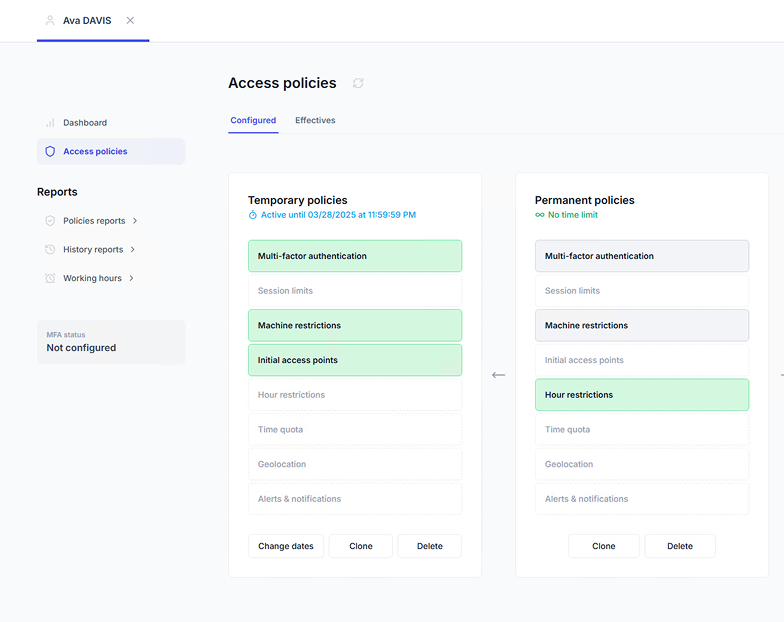
Control access with contextual policies (location, time, machine, number of concurrent sessions).
See activity in real time across every session type, from one dashboard.
Respond immediately by locking or logging off a session remotely.
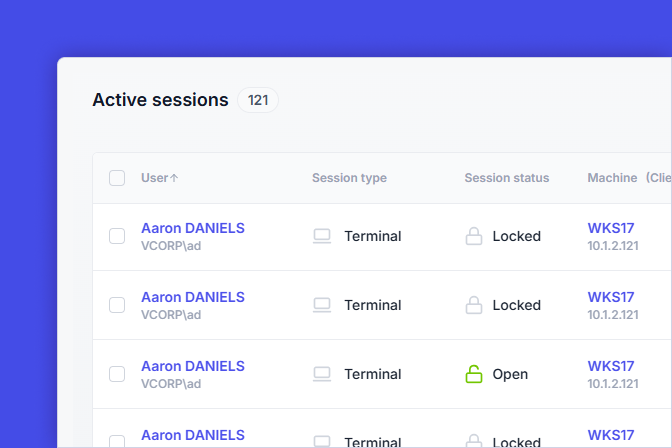
UserLock sits at the AD authentication layer and sits on top of your existing AD. It's works with the infrastructure you already have to record every logon and session event as it happens across workstation, terminal, interactive, IIS, VPN, SaaS, and UAC).
UserLock's console shows who is connected, from which machines, since when, and for how long. Because MFA and contextual access policies apply before each session starts, you can prove that policies are active and working. Session-based policies allow you to adjust for risk. For example, an RDP session might need tighter, more frequent controls than a local workstation logon.
Concurrent session limits add another security layer. When each user can only have one session open at a time, shared credentials and stolen passwords are easier to notice.

UserLock allows admins to set criteria for what they consider "critical" risk. This helps avoid noise so admins get alerts only on what matters.
)
)
)
Activity that falls outside of these parameters gets flagged as risky, so admins can see which accounts need attention.
When UserLock detects a suspicious event, it alerts admin by pop-up or email. Examples include:
Failed logon attempts
Attempts to log on to default accounts
Activity outside defined working hours
From the alert, IT can react instantly. They can lock or logoff the session remotely, or block the user completely.


Many AD attacks start with spear phishing or other social engineering techniques to capture a user's credentials. UserLock can notify users in real time when their credentials are used to log on while they have an active session open.
If users see a logon they don't recognize, they can report it to IT right away. This helps keep users accountable, and also makes it harder for stolen passwords to go unnoticed.
Real-time monitoring also builds a complete record for compliance audits and IT forensics. UserLock stores access activity in a database and generates reports, including:
Session history
MFA events
Administrator actions
Simultaneous session history

These reports help support common monitoring and access control requirements across cybersecurity compliance frameworks such as PCI DSS, HIPAA, NIS2, and ISO 27001.
UserLock makes it easy for the entire IT team to manage user activity. It's built for on-premises Active Directory, including fully offline and air-gapped networks, and evolves with you as your environment moves to hybrid.
"With UserLock we have an effective network access management tool. It has helped simplify IT's work by reducing between 70 and 90% the time spent monitoring and auditing network access of all users."
Antonio Fernandes S. Oliveira - Network manager, Pernambuco State Traffic Department, Brazil