How to secure client access to custom RD Web applications
Software developers use UserLock to secure client access to custom applications running on RD Web.
Published February 26, 2026)
)
)
)
For software developers running specialized applications through IIS-based RD Web, securing client access with strong authentication and access controls can quickly become complex. If you're looking for a way to layer effective security on access to custom applications, there is a simpler option. Here's how UserLock can help.
The core problem is that, as with IIS itself, RD Web (formerly Terminal Services Web Access) is a legacy application that dates from the early 2000s, long before security measures like multi-factor authentication (MFA) became standard.
While RD Web provides reliable browser-based remote access to on-premises applications, it does not include built-in MFA.
In 2019, Microsoft introduced Azure Virtual Desktop (AVD) as RD Web's cloud-based successor. But despite predictions of its decline, RD Web remains widely used, especially for specialized or legacy applications and use cases that aren't easy to move to the cloud.
That leaves developers and IT teams with a challenge: how to secure RD Web access without adding unnecessary cost or complexity.
The following are some recent customer use cases for RD Web that illustrate its continued importance:
A construction software provider needed a simple way to add MFA to secure client connections to their custom application delivered through RD Web.
A car rental application delivered via RD Web required stronger authentication controls for client access.
A medical software company needed cost-effective MFA for thousands of custom app users across multiple Active Directory domains.
These examples show that RD Web remains relevant, from small installations to relatively large, multi-domain environments.
It’s another example of how many organizations find themselves operating in a hybrid model today. SaaS and Microsoft 365 may run in the cloud, while specialized applications often remain on-prem.
Apply MFA for custom apps
See how to add UserLock MFA for IIS-hosted applications published via RD Web.
For many, especially smaller software developers, moving to a per-seat cloud subscription model does not make financial sense for a specialized application.
RD Web allows them to centralize security and licensing while supporting complex or legacy applications that may not be cloud-ready. These applications may be difficult to manage or not supported by specific operating systems.
Importantly, many organizations use RD Web because they want greater control over their infrastructure. Keeping systems and application data on-premises also supports sovereignty and compliance requirements, since the organization retains full control.
An RD Web connection is accessed through a simple URL, for example: https://hostname.domain/rdweb
However, because users access RD Web through a public URL, it's internet-facing. This makes strong authentication and access controls essential.
One option is to use a cloud identity provider (IdP). But this often introduces additional subscription costs, integration effort, and dependence on an external authentication service.
For organizations that chose RD Web to keep infrastructure in-house, adding cloud-based authentication can reintroduce complexity.
UserLock provides cost-efficient MFA for IIS and RD Web. Because UserLock is designed for on-prem and hybrid setups, you don't have to rewire identity or manage an additional cloud IdP.
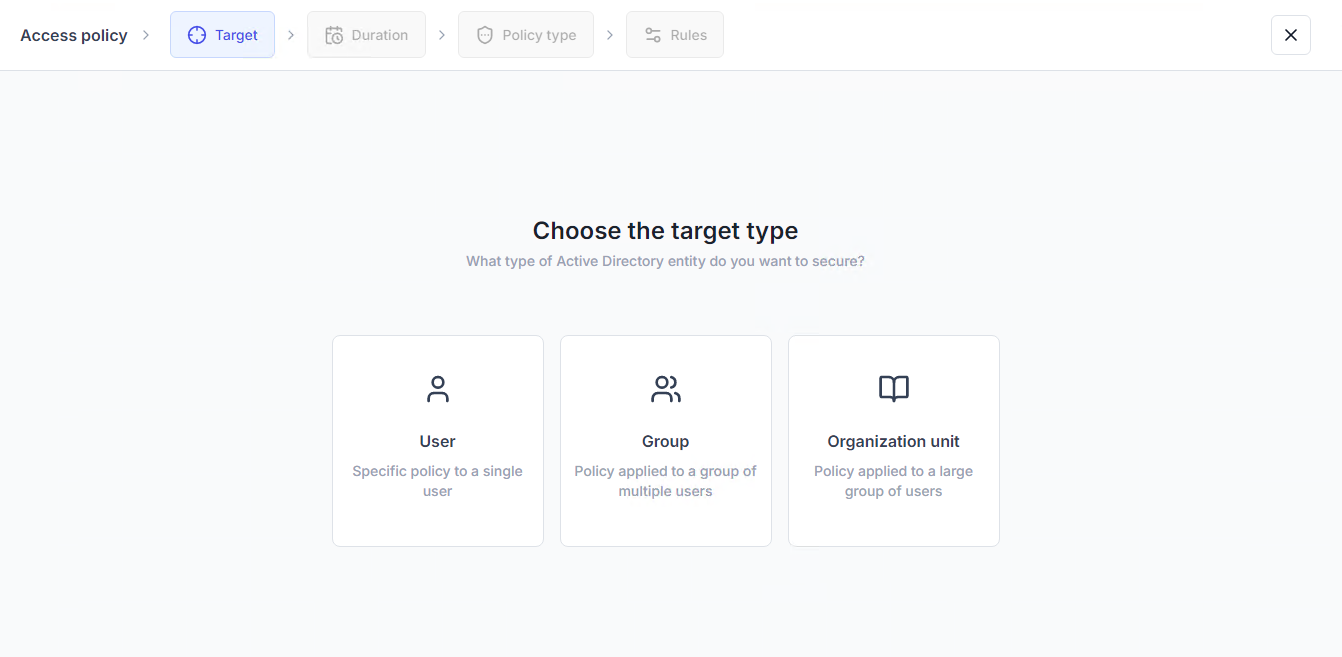
UserLock integrates with your AD, so admins can set access rules on existing AD users, groups, and organizational units (OUs).
IT can also granularly control how often to prompt for MFA depending on connection and session type.
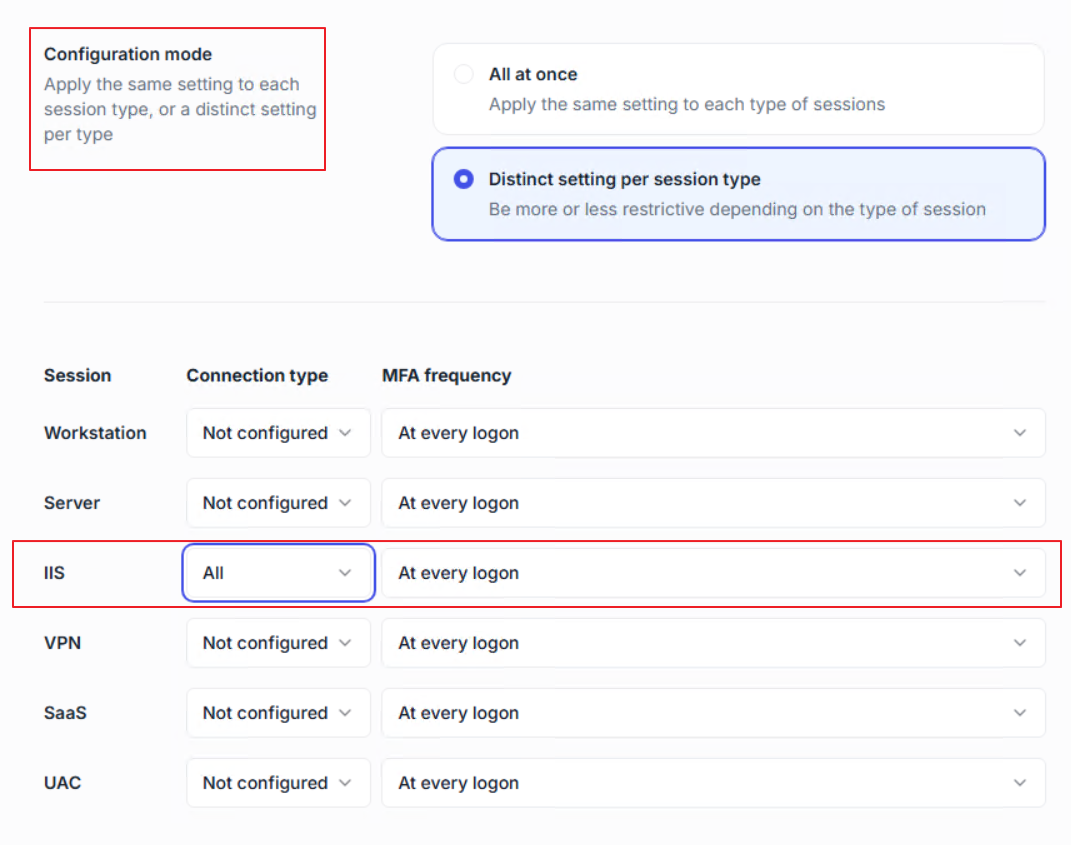
The only prerequisite is that the UserLock IIS agent needs to be installed in the RDWeb IIS server.
UserLock also allows admins to enforce MFA in the published applications rather than having to ask users to authenticate via RD Web and, separately, via RD Gateway by having the desktop agent installed on each host published in the service.
If your organization uses RD Web to provide remote access to custom applications, UserLock adds strong access controls without increasing complexity.
UserLock secures RDP and VPN connections via multiple MFA methods:
Push notifications (UserLock Push app)
Authenticator apps (Microsoft, Google)
Hardware tokens and keys (YubiKey, Token2)
Administrators can also enforce:
Concurrent session limits to set granular controls on how many (if any) concurrent logins and simultaneous sessions to allow.
Context-based access restrictions that work behind the scenes to limit access by workstation, IP address range, connection type, and time.
Importantly, UserLock allows IT to monitor sessions connected to RD Web in real time. Admins can remotely log off, lock, or disconnect suspicious sessions.
To support compliance, IT can create and export reports on MFA events, user logons, and administrator actions.
For software developers, adding MFA to IIS-based custom RD Web apps does not need to be complicated.
Instead of introducing cloud identity services and additional subscription costs, organizations can add modern identity security to their existing Active Directory environment with UserLock.
With a single-server, agent-based deployment, UserLock provides IT teams with flexible MFA and granular access control while keeping critical workflows fully on-premises.
For developers delivering specialized applications via IIS and RD Web, that means stronger security without added architectural complexity.