How HIPAA technical safeguards are key to compliance
Learn how to meet HIPAA technical safeguards requirements with UserLock and FileAudit.
Updated April 20, 2026)
)
)
)
HIPAA’s Security Rule divides its protections into three “safeguard” categories: technical, administrative and physical. HIPAA technical safeguards are the foundation of HIPAA compliance, and in this post you’ll learn how both UserLock and FileAudit help meet different HIPAA compliance requirements and better protect patient data.
The Technical Safeguards are (as defined in § 164.304) the technology and related policies and procedures that protect electronic protected health information (EPHI) and control access to it.
The Technical Safeguards of HIPAA’s Security Rule are requirements for compliance, but they provide flexibility for organizations to determine which technical security measures to implement. This is a decision that must be based on what is reasonable and appropriate for their specific organizations.
The following are the technical standards and implementation specifications that IS Decisions solutions can help address.
FileAudit: File access monitoring for HIPAA
Technical Standards | Implementation Specifications (R=Required, A=Addressable) | IS Decisions Solution | |
|---|---|---|---|
Access control | Unique user identification | R | UserLock |
Emergency access procedure | R | ||
Automatic logoff | A | UserLock | |
Encryption and decryption | A | ||
Audit controls | R | UserLock & FileAudit | |
Integrity | Mechanism to authenticate EPHI | A | FileAudit |
Person or entity authentication | R | UserLock | |
Transmission security | Integrity controls | A | |
Encryption | A | ||
“Assign a unique name and/or number for identifying and tracking user identity.”
Frequently referred to as “Logon name” or “User ID”, use of this unique name provides a means to verify the identity of the person using the system.
IS Decisions research found over a third (37%) of healthcare workers do not have a unique ID to log on to their employer’s network.

What’s more, ensuring that user really is who they say they are is another matter.
Sharing logins naturally obfuscates user identification, meaning you cannot possibly confirm who really has access to the network, and the files within, not to mention when or where from.
Logins are also often compromised by either external attackers or malicious insiders.
To verify the identity of the user and stop unauthorized access that stem from password sharing or compromised credentials, organizations turn to UserLock.
UserLock can control concurrent logins to alleviate password sharing. It also permits or denies logins based on a range of contextual access criteria (e.g., user location, workstation/device, access time). This helps verify the identity of the user and stop unauthorized access from users who have no access rights but are trying to deliberately circumvent the system to gain access.
Without unique identifications, an organization cannot provide evidence that a specific employee took an action, making any kind of monitoring or preventative measures extremely difficult, not to mention punitive. The audit logs would just show which account was used, but not the actual user if the accounts are shared. What’s more, how can an organization have a termination procedure that requires them to remove employees’ access if they use a shared single login?
“Terminate an electronic session after a predetermined time of inactivity.”
IS Decisions research found that only 38% of healthcare workers are automatically logged off the network after a period of inactivity.

Logoff procedure should not be left to the user. Automatic logoff is an effective way to prevent unauthorized users from accessing EPHI on a workstation that is left unattended for a period of time.
To take this a step further, identification continues to be obfuscated if the user can login from multiple devices or locations. Disabling concurrent logins strengthens the affirmation that it is the designated employee using their unique ID, and not an intruder or someone they have shared their password with.
UserLock can automatically logoff a session after a specific length of idle time.
“Implement hardware, software, and/or procedural mechanisms that record and examine activity in information systems that contain or use electronic protected health information.”
IS Decisions offer comprehensive auditing on all access events across the network.
UserLock records, centralizes and audits all network logon events.
With clear, searchable logon event audit logs, IT can review logs after an incident to support IT forensics. By ensuring a user is who they say they are (see above, Unique User Identification), IT can accurately identify, search, and report on all user access and hold a user accountable for any malicious activity.
)
)
)
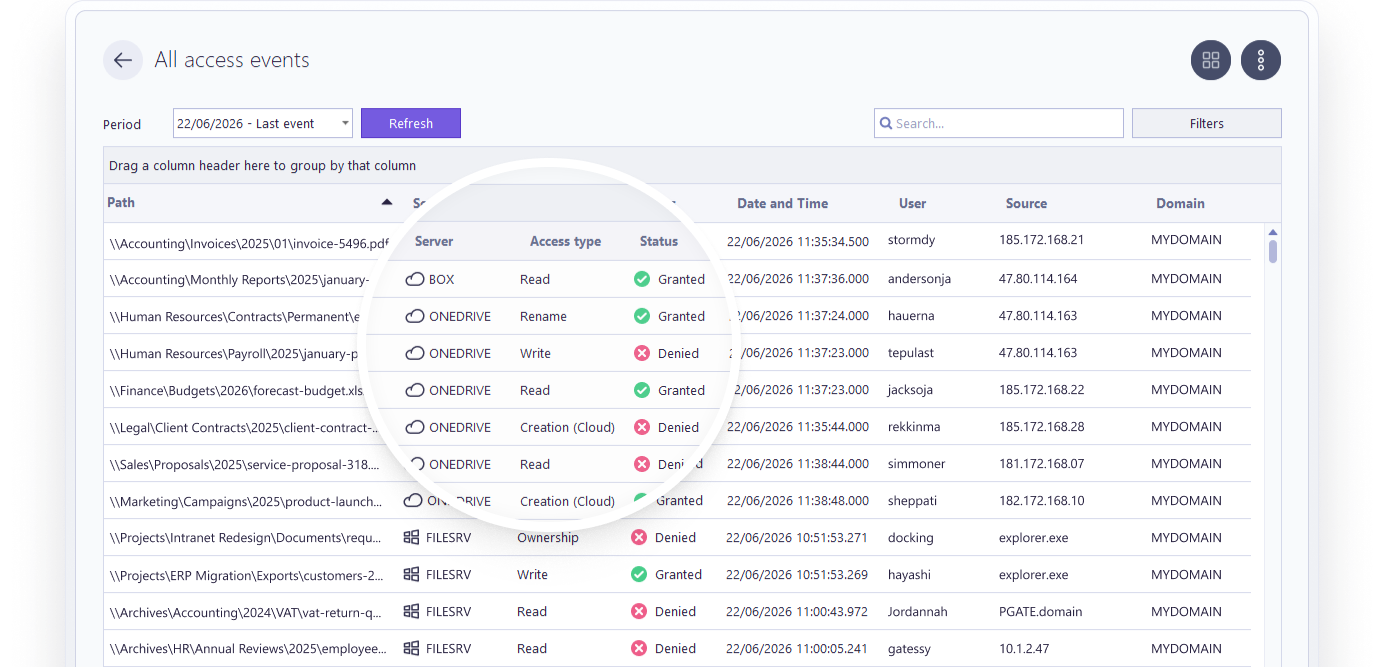
FileAudit centralizes audit logs on all access and access attempts to files and folders.
With reporting, it's easy to see who accessed a file or folder, what they did with that access, and when. FileAudit also identifies the IP address of the machine from which the file/folder access took place, pinpointing exactly where the user has accessed the file from. This helps strengthen user identification and accountability by identifying potentially suspicious activities, such as if the user accessed the file from a different workstation than usual.
“Implement electronic mechanisms to corroborate that electronic [PHI] has not been altered or destroyed in an unauthorized manner.”
EPHI that is improperly altered or destroyed can result in clinical quality problems for an organization, including patient safety issues. Employees may make accidental or intentional changes that improperly alter or destroy EPHI.
FileAudit enables IT professionals to monitor access to sensitive files and folders on Windows systems in real-time. It constantly examines and records read/write/delete accesses (or access attempts), file ownership changes and permission modifications, so IT or management can address any inappropriate access. Specific actions such as bulk file copying and mass file deletion or movement can be alerted on, to ensure things are reviewed and remediated quickly.
“Implement procedures to verify that a person or entity seeking access to electronic protected health information [PHI] is the one claimed.”
Authentication involves confirming that users are who they claim to be. The password (something known only to the individual) is the most common way to obtain authentication to an information system and the easiest to establish. HIPAA does not specify what procedures should be implemented, but guidance from the Department of Health and Human Services suggests three ways for users to verify their identity:
With something only known to the user, such as a password or PIN.
With something the user possesses, such as a smart card or key, or
With something unique to the user, such as a fingerprint or facial image.
Using more than one method is best. According to HIPAA journal, multi-factor authentication (MFA) is key to compliance with HIPAA requirements. The article specifies that while HIPAA does not require multi-factor authentication at present, but a proposal is under review in the 2025 Security Rule NPRM to "mandate 2FA for email accounts and systems maintaining sensitive information."

UserLock's on-premises Active Directory multi-factor authentication helps organizations verify that authenticated users are who they say they are. And, with single sign-on (SSO) and contextual restrictions, healthcare organizations can reap the benefits of MFA without adding friction to clinical workflows.
Requirements such as the technical safeguards of HIPAA’s Security Rule are, by nature, foundational. They cover so many different types of organizations that they have to apply to the lowest common denominator within their remit.
With UserLock and FileAudit the aim is not only to achieve compliance, but also to reach beyond compliance and help organizations run a more secure organization that better mitigates the risks connected to patient data.