Controlling shadow access: Why concurrent session control is fundamental
Why controlling concurrent sessions in Active Directory is a fundamental security control.
Published February 2, 2026)
)
)
)
Concurrent session controls, the ability to manage who can simultaneously log into multiple applications or servers using a single user account, is a security measure that’s easy to downplay.
User accounts are a big target for criminals looking to get behind an organization’s defenses. Giving users the ability to log into multiple computers at the same time, so-called shadow access, simply expands this attack surface in ways that quickly become impossible to monitor or control.
One session might be legitimate, while a second or third might not. How can security teams tell the difference between good and bad access? Without a way of controlling concurrent sessions, the truth is, they can’t.
Unavoidably, then, the ability to limit concurrent sessions and logins to Active Directory is fundamental to good security, especially in on-premises Active Directory environments. In the government sector, it is also an assumed part of every important security framework, regulation, and best practice guideline.
Allowing users to open more than one concurrent connection adds to the risk that account poses should its credentials be compromised – attackers can connect to multiple resources under the cover of what looks like legitimate concurrent access.
Concurrent sessions make it harder to detect whether user behavior is malicious. One session might look unusual while a second might look normal, confusing oversight.
If multiple users share credentials (two or more users open concurrent connections from the same account), this makes it difficult to trace an action to a specific person, a requirement to meet financial services regulations.
Controlling concurrent sessions is part of most regulations and frameworks relevant to government organizations and supply chain, although this varies from country to country and isn’t always explicit. More often, concurrent access control is implied as part of a separate control, for example privilege restriction.
While frameworks such as NIST are not regulations as such, fulfilling their recommendations is often still required in many government contexts.
NIST 800-53 (Revision 5): A mandatory requirement for US federal agencies and suppliers handling controlled unclassified information (CUI), section AC-10 on concurrent session control makes clear that organizations must define a limit for the number of concurrent sessions for every user, especially privileged admins.
For US organizations, NIST is required to meet DFARS (Defense Federal Acquisition Regulation Supplement) 252.204-7012 and CMMC (Cybersecurity Maturity Model Certification) Level 2.
NIST SP 800-171: Although not mandatory, concurrent access control is implicit in other requirements, for example controlling account sharing, credential misuse, and the enforcing least privilege.
FISMA (Federal Information Security Modernization Act): a US law that mandates adherence to NIST recommendations for controlling concurrent access.
ISO 27001: Refers to concurrent session control across a range of requirements, including the need to secure logins, limit the misuse of privileged accounts, and maintain an audit trail, all affected by concurrent sessions.
NIST Cybersecurity Framework (CSF): The influential CSF is a framework of best practices and outcomes and doesn’t mandate specific controls. However, controlling credential sharing, reducing account misuse, and enforcing least privilege are recommended; all of these imply session control.
Historically, users were often allowed to open multiple sessions because this was convenient where employees used different devices at more than one location. Gradually, organizations realized this created unnecessary risk, but many lacked a way of limiting them.
Despite this, there are occasions where allowing users to log in to two or more sessions using the same user account is necessary. The obvious example are admin accounts, where the ability to open concurrent sessions on multiple computers is a necessary part of the job.
In an era of fixed, remote, and mobile devices, even ordinary users sometimes need more than one simultaneous session. The art is working out who falls into each category and finding a way to control them without that getting in the way of legitimate activity.
Concurrent session control is about more than simply allowing or blocking additional sessions. If the user opens an additional session, there needs to be a way to distinguish the primary session from the secondary.
Unfortunately, the native controls in Active Directory (AD) lack a mechanism to track user sessions across devices or connections.
UserLock solves the problem by analyzing sessions in real time, identifying the parent session from any opened subsequently. This allows UserLock to control the correct session according to a pre-defined security policy.
Setting up concurrent sessions involves adding an access policy, which can relate to a specific AD User or user type, Group, or Organizational Unit on a temporary or permanent basis.
Admins can also set concurrent session limits by channel (VPN, Wi-Fi, IIS, SaaS), which, in the case of a VPN, would normally be 1.
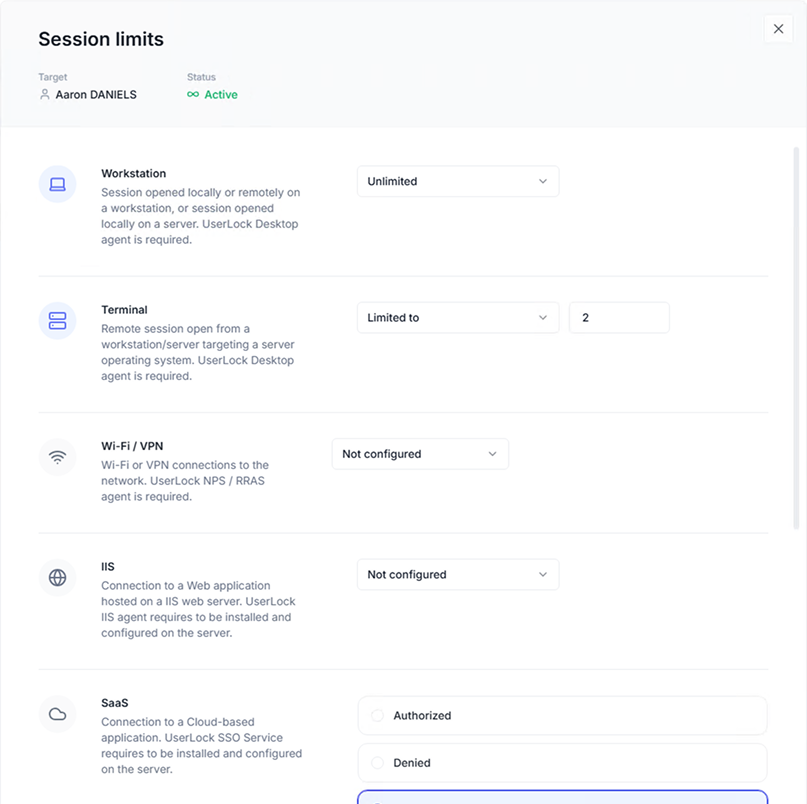
UserLock also allows granular session-based access restrictions, such as:
session type (workstation, terminal, Wi-Fi, VPN, and IIS)
time of day
logon origin (workstation, device, IP range, organizational unit (OU), department, and country)
When users attempt to open a concurrent connection, admins have the power to block, force logoff of the previous session, or auto-lock existing sessions (the session remains logged in but suspended).
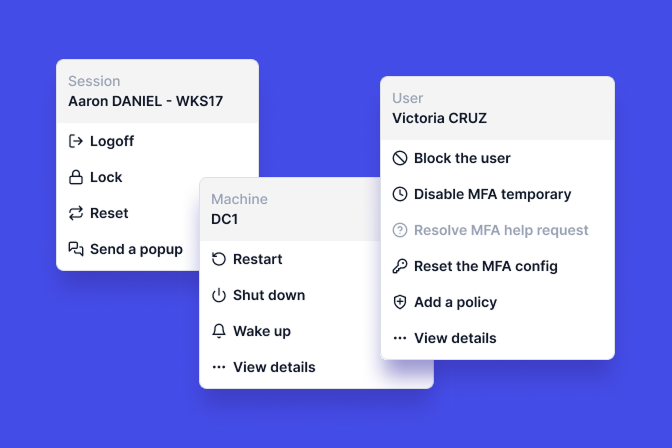
Users can also be given the option to close a previous session to ensure they don’t lose documents.
Concurrent logins are a classic example of a network convenience that got out of hand. For years, the risk caused by concurrency was underestimated and downplayed. The rise of credential theft as a major form of network compromise changed this.
In the government sector in particular, concurrent session control is now a fundamental security principle.
The problem is that on-premises tools built into native systems, such as AD, remain weak when it comes to controlling concurrent access.
UserLock, by contrast, was designed from the ground up to integrate concurrent session control as part of the wider security controls it offers.
It’s tempting to view controlling concurrent sessions as a secondary concern. But as legitimate user accounts have become a major target for attackers, controlling concurrent sessions is where good security should start.